> ## Content Index
> Fetch the complete content index at: https://datascientyst.com/llms.txt
> Use this file to discover other available public pages before exploring further.
# How to Pretty Print Newlines in Pandas DataFrame
- URL: https://datascientyst.com/pretty-print-newlines-in-pandas-dataframe/
- Published: 2021-11-04T07:31:21.000Z
- Updated: 2023-09-26T14:18:15.000Z
- Author: John D K
- Tags: Display
In this short post, you'll see how to pretty print newlines inside the values in Pandas DataFrame. Brief example is included for demonstration purposes.
You can find the two ways below:
**(1) Using df.to\_html().replace**
```python
from IPython.display import display, HTML
display( HTML( df.to_html().replace("\\n","
")))
```
**(2) By df.style.set\_properties**
```python
display(df.style.set_properties(**{
'text-align': 'left',
'white-space': 'pre-wrap',
})
```
Suppose we have a DataFrame like:
| name | url | url2 |
| ------------- | ------------------------- | ----------------------------------------- |
| Softhints | https://www.softhints.com | https://www.blog.softhints.com/tag/pandas |
| DataScientyst | https://datascientyst.com | https://datascientyst.com/tag/pandas |
Let's create new column which is concatenation of all others with separator a new line:
```python
df['all'] = df['name'] + '\n' + df['url'] + '\n' + df['url2']
```
result:
| url2 | all |
| ----------------------------------------- | --------------------------------------------------------------------------------- |
| https://www.blog.softhints.com/tag/pandas | Softhints\\nhttps://www.softhints.com\\nhttps://www.blog.softhints.com/tag/pandas |
| https://datascientyst.com/tag/pandas | DataScientyst\\nhttps://datascientyst.com\\nhttps://datascientyst.com/tag/pandas |
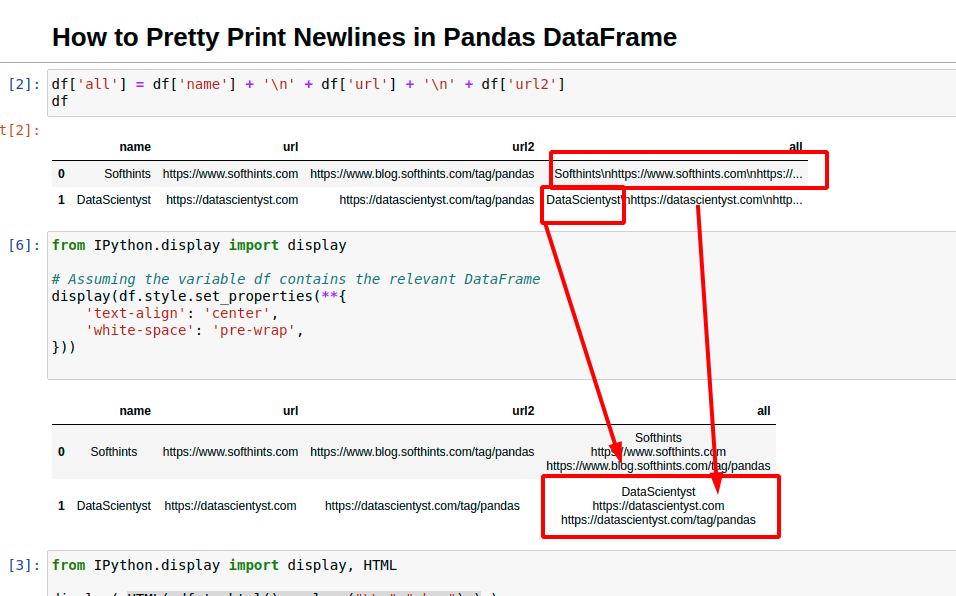
As you can see default print is showing the string values as a single line - ignoring the newlines.
## df.to\_html().replace
If you like to print newlines you need to use the following approach:
To print or display new lines inside columns in Pandas DataFrame you can: \* convert the output to HTML
- replace all new lines with `
` \- HTML tag for new line
- display the result as HTML
```python
from IPython.display import display, HTML
display( HTML( df.to_html().replace("\\n","
") ) )
```
now all **newlines symbols are printed or displayed in Jupyter cells correctly**:
| | url2 | all |
| - | ----------------------------------------- | --------------------------------------------------------------------------- |
| 0 | https://www.blog.softhints.com/tag/pandas | Softhintshttps://www.softhints.comhttps://www.blog.softhints.com/tag/pandas |
| 1 | https://datascientyst.com/tag/pandas | DataScientysthttps://datascientyst.comhttps://datascientyst.com/tag/pandas |
You can define also a method like:
```python
from IPython.display import display, HTML
def print_newlines(df):
return display( HTML( df.to_html().replace("\\n","\") ) )
print_newlines(df)
```
## df.style.set\_properties
Alternative method is by changing Pandas properties:
- `white-space`
- `text-align`
Let say you would like to have newlines and centered values. Then you can use `style.set_properties` with the following values:
```python
df.style.set_properties(**{
'text-align': 'center',
'white-space': 'pre-wrap',
})
```
## Resources
- [Notebook](https://github.com/softhints/Pandas-Tutorials/blob/master/styling/pretty-print-newlines-in-pandas-dataframe.ipynb?ref=datascientyst.com)
- [pandas.DataFrame.to\_html](https://pandas.pydata.org/docs/reference/api/pandas.DataFrame.to%5Fhtml.html?ref=datascientyst.com)
- [pandas.io.formats.style.Styler.set\_properties](https://pandas.pydata.org/docs/reference/api/pandas.io.formats.style.Styler.set%5Fproperties.html?highlight=set%5Fproperties&ref=datascientyst.com)