Use applymap
Code:
df.head()"
]}
df = pd.DataFrame.from_dict(data)
```
DataFrame looks like:
| | title | html |
| - | --------- | ----------------------------------- |
| 0 | Intro | Hello |
| 1 | Code | Use applymap
Code:
df.head() |
We would like to **extract the raw text from the column without the HTML tags with Python**:
| | html |
| - | --------------- |
| 0 | Hello |
| 1 | Use applymap |
| 2 | Code: df.head() |
## Step 1: Install Beautiful Soup library
First we will need to install Python library - [beautifulsoup4](https://pypi.org/project/beautifulsoup4/?ref=datascientyst.com) by:
```python
pip install beautifulsoup4
```
The official documentation of the library is available on this link: [Beautiful Soup Documentation](https://www.crummy.com/software/BeautifulSoup/bs4/doc/?ref=datascientyst.com).
The Beautiful Soup is described as:
> Beautiful Soup is a Python library for pulling data out of HTML and XML files.
## Step 2: Extract text from HTML tags by Python
Now let's check how we can **extract the text from HTML code or tags in Python.** We will demonstrate the extraction in simple example.
Suppose we have the following HTML document:
```python
html_doc = """The Dormouse's story
Once upon a time there were three little sisters; and their names were
""" ``` We can extract the raw text from the HTML tags by: ```python from bs4 import BeautifulSoup soup = BeautifulSoup(html_doc, 'html.parser') print(soup.get_text()) ``` Which will result in: ``` The Dormouse's story The Dormouse's story Once upon a time there were three little sisters; and their names were ``` Or we can pretty print the HTML code by: ```python print(soup.prettify()) ``` the output is: ```htmlThe Dormouse's story
Once upon a time there were three little sisters; and their names were
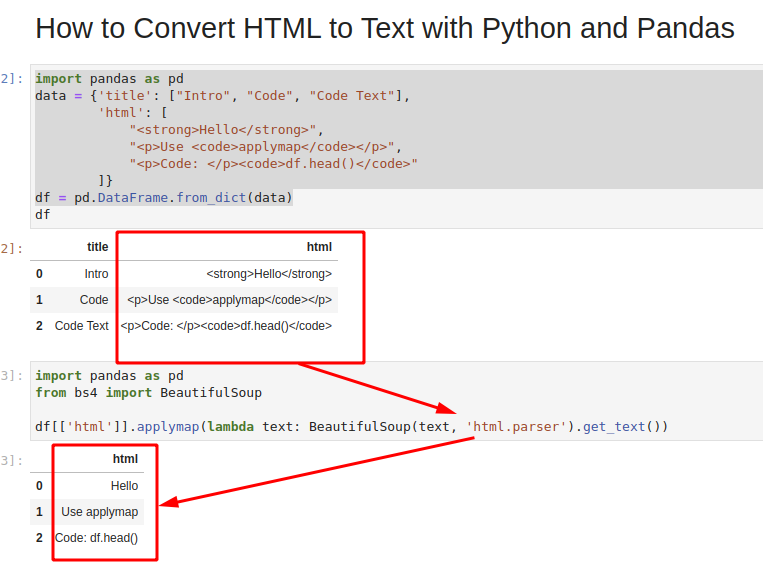
``` ## Step 3: HTML to raw text in Pandas In order to **convert HTML to raw text we will apply BeautifulSoup library to Pandas column.** To apply the BeautifulSoup function `soup.get_text()` to Pandas column we can use the following code: ```python df[['html']].applymap(lambda text: BeautifulSoup(text, 'html.parser').get_text()) ``` The result is: | | html | | - | --------------- | | 0 | Hello | | 1 | Use applymap | | 2 | Code: df.head() | How does it work? We are applying the function `.get_text()` with `html.parser` to each row from the DataFrame - `df[['html']]` \- in this case it has only a single column. If we pass non HTML column or NaNs we will get errors. ## Conclusion In this post, we saw how to **convert HTML tags or document into raw text with Python and Pandas.** We've learn also how to apply **BeautifulSoup library function to Pandas DataFrame.** The image below shows all the steps which we covered: